
 Getting Outlook to work again properly when experiencing startup errors, crashes or hangs (Not Responding in the Title Bar) often is not that hard but it does require some specific knowledge about the inner workings of Outlook.
This guide explains all you need to know about that in order to get your Outlook to start without errors again.
Note:
Aside from solving problems with starting Outlook, this guide can also be used as a base to troubleshoot other common Outlook issues.
We’ll start off this guide with 3 easy questions. Depending on the answers, you could possibly skip large portions of this guide or even directly get a solution to your startup issue.
- Is Outlook up-to-date?
- Did Outlook ever work?
- Does Outlook still work for other users on the computer?
- Safe Mode
- Cannot open the Outlook window
- Reset dat-files
- Disable add-ins
- Use scanpst.exe to fix Outlook Data File errors
- Recreate your mail profile
- Run a Repair, Office Diagnostics or reinstall Office/Outlook
- Check the Event Viewer and post in the Outlook forum for further help
Is Outlook up-to-date?
 Just to make sure you are not trying to troubleshoot an issue which has already been solved, before you begin verify that you have installed all updates for your version of Outlook.
Also note that Outlook 2007 and Outlook 2010 are no longer supported versions of Outlook and may have compatibility and security issues with Windows 10 and Windows 11 which will no longer be addressed.
Solution:
When you are using an MSI-based installation of Outlook 2016 or previous, you can configure Microsoft Update to also check for Office updates.
When you use a Click-to-Run based installation of Outlook 2013, Outlook 2016, Outlook 2019, Outlook 2021 or Microsoft 365, then you can manually check for updates via the Update Options button that is show by going to File-> Office Account in Outlook. Fixes for known issues and bugs in Outlook are released on a monthly basis.
Did it ever work?
 Did Outlook still work correctly the last time you used it? If so, you probably can skip this solution. If it never worked before or if you are starting Outlook for the very first time, it could very well be that you have not configured your mail account correctly. A common mistake is choosing for an Exchange account while in fact you are using a POP3 or IMAP account.
Solution:
At this point, it is often easiest to recreate your mail profile via the Mail applet in Control Panel. When recreating the mail profile, make sure you’re using the correct server settings provided by your ISP or corporate email administrator. An overview of the settings from some of the largest free email account providers can be found here.
Does Outlook still work for other users on the computer?
 If you share this computer with another user, you can ask this other user to logon and ask to verify if Outlook is still working for him or her. If you are the only user of this computer, then you could also add another user to Windows just for testing purposes via the User Accounts applet in Control Panel or the Accounts section in the Settings app on Windows 10 or Windows 11.
Solution:
If it doesn’t work for another user on the computer either, then the issue is most likely caused by a faulty add-in or a damaged Outlook/Office installation.
If it works for another user on the computer or you have no way to check this, continue to the next step in this guide.
Safe Mode
 If Outlook worked correctly the last time and nothing has changed about your account configuration, then checking if things work correctly in Safe Mode is a good first step. Starting Outlook in Safe Mode will prevent some or all add-ins from being loaded, prevents several settings files from being loaded and turns off the Reading Pane.
To start Outlook in Safe Mode you’ll need to start Outlook with the “safe” switch;
- Windows 7
Start-> type;outlook.exe /safe - Windows 8
Start Screen-> type;outlook.exe /safe
(just start typing, a search box will automatically become visible) - Windows 10
Start-> type;outlook.exe /safe
(just start typing, a search box will automatically become visible or type in the command in the Search box) - Windows 11
Start-> type;outlook.exe /safe
(just start typing, a search box will automatically become visible or type in the command in the Search box) - All Windows versions
Hold the CTRL button when clicking on the Outlook button to start it. You will get prompted whether you want to start Outlook in Safe Mode.
When typing, please note the space between outlook.exe and /safe.
For alternative methods of starting Outlook in Safe Mode see this Quick Tip.
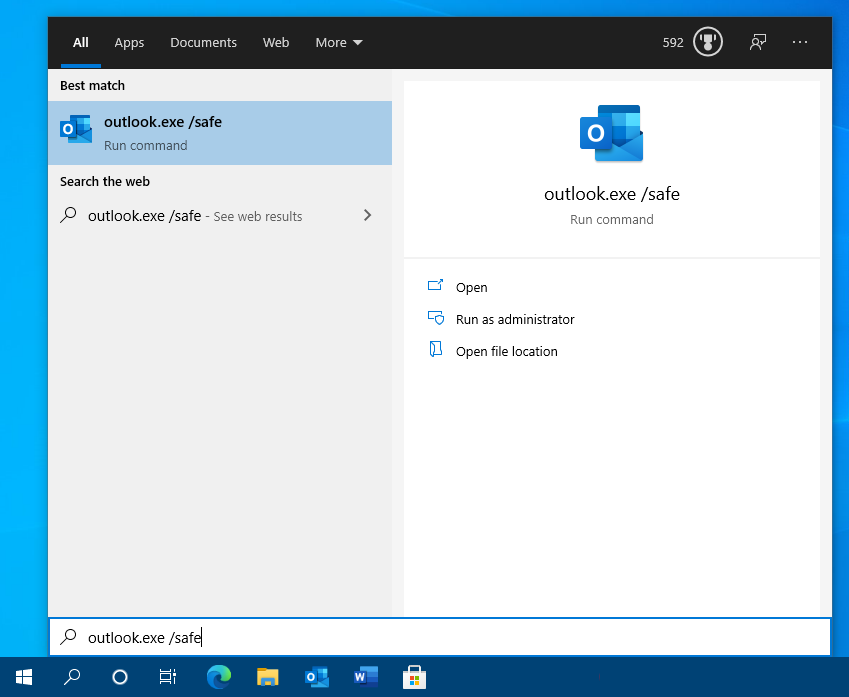
Starting Outlook in Safe Mode from the Start Menu or Search feature in Windows 10.
Solution:
If it works in Outlook Safe Mode, the issue is most likely caused by an add-in, a corrupted settings file or the first message that is being displayed when Outlook is started. See the next 3 troubleshooting steps below for further analysis of the issue. If it doesn’t work in Safe Mode either, the next 3 steps will probably not help you either to solve it and you can continue with scanning your pst-file for errors.
Cannot open the Outlook window
 If you get the error “Cannot open the Outlook window” when trying to start Outlook, the error usually indicates that your Folder Pane or Navigation Pane settings holds a corruption.
Solution:
Start Outlook with the resetnavpane switch;
- Windows 7
Start-> type;outlook.exe /resetnavpane - Windows 8
Start Screen-> type;outlook.exe /resetnavpane
(just start typing, a search box will automatically become visible) - Windows 10
Start-> type;outlook.exe /resetnavpane
(just start typing, a search box will automatically become visible or type in the command in the Cortana Search box) - Windows 10
Start-> type;outlook.exe /resetnavpane
(just start typing, a search box will automatically become visible or type in the command in the Cortana Search box)
When typing, please note the space between outlook.exe and /resetnavpane.
If you encounter this issue more often, see this Quick Tip to find a more definitive solution.
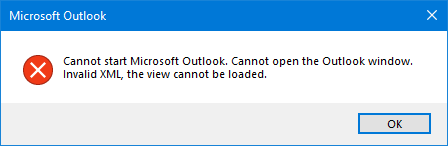
The “Cannot open the Outlook window” error can be fixed quite easily.
Reset dat-files
 If you are still using Outlook 2007 or previous, Outlook stores several settings in dat-files which get loaded upon startup. These files sometimes get corrupted and renaming them to
 .old could get you back into Outlook then. Outlook 2010 and later do no longer use these files so if you are using Outlook 2010 or later, you can skip this step.
Solution:
Reset extend.dat and outcmd.dat by renaming them to .old when Outlook is closed. You can find them in the locations below;
- extend.dat
- This file keeps the settings of installed Exchange Client Extensions add-ins and their status.
C:\Users\%username%\AppData\Local\Microsoft\Outlook\
- outcmd.dat
- This file contains your Toolbar customizations.
C:\Users\%username%\AppData\Roaming\Microsoft\Outlook\
Tip!
If you are having trouble locating these folders you can also use OutlookTools (free!)
Disable add-ins
 If Outlook works in Outlook Safe Mode but resetting your dat-files did not help, then the issue is most likely caused by an add-in.
Often, but not always, this is accompanied by an error similar to:
“The add-in <reference to add-in> could not be installed or loaded. This problem may be resolved by using Detect and Repair on the Help menu. Unable to load <reference to add-in dll>.“
The instructions given in the error will seldom actually fix this issue as the issue is more likely to be caused by the add-in itself, rather then by an Outlook installation issue.
Solution:
Start Outlook in Safe Mode again and disable all your add-ins. After this, you can start Outlook normally again and see if it works now. If so, you can enable them one by one until Outlook fails to load again. The add-in you last enabled is most likely the cause of your issue. Uninstall or reinstall this add-in or check with the vendor for updates or contact them for further troubleshooting their add-in.
You can enable/disable Outlook add-ins in the following locations;
- Outlook 2007
Tools-> Trust Center…-> section Add-Ins - Outlook 2010 / 2013 / 2016 / 2019 / 2021 / Microsoft 365
File-> Options-> section Add-Ins
For more detailed instruction on how to enable or disable add-ins see this Quick Tip.
If you you get an error that you cannot disable the add-in see this Quick Tip instead.
Tip!
Virus scanners which integrate themselves with Outlook are known to cause a lot of issues. Uninstalling this part of your virus scanner is strongly advised; you’d still be sufficiently protected by your on-access scanner part of the virus scanner. For more details see this Quick Tip.
Use scanpst.exe to fix Outlook Data File errors
 When you use a pst-file, it could be that an issue with that pst-file is preventing Outlook from starting correctly.
Often this issue is accompanied by the message;
“Errors have been detected in the file <path to pst-file>. Quit all mail-enabled applications, and then use the Inbox Repair Tool.“
Solution:
Use scanpst.exe to scan the mentioned pst-file for errors. The location of scanpst.exe depends on your version and language of Outlook.
- Microsoft 365 / Outlook 2021 / Outlook 2019 / Outlook 2016 Click to Run
C:\Program Files\Microsoft Office\root\Office16 - Outlook 2016 (MSI-based Volume License installation)
32-bit Windows:C:\Program Files\Microsoft Office\Office16
64-bit Windows:C:\Program Files (x86)\Microsoft Office\Office16
64-bit Outlook:C:\Program Files\Microsoft Office\Office16 - Outlook 2013
32-bit Windows:C:\Program Files\Microsoft Office\Office15
64-bit Windows:C:\Program Files (x86)\Microsoft Office\Office15
64-bit Outlook:C:\Program Files\Microsoft Office\Office15
Click to Run:C:\Program Files\Microsoft Office\root\office15 - Outlook 2010
32-bit Windows:C:\Program Files\Microsoft Office\Office14
64-bit Windows:C:\Program Files (x86)\Microsoft Office\Office14
64-bit Outlook:C:\Program Files\Microsoft Office\Office14 - Outlook 2007
32-bit Windows:C:\Program Files\Microsoft Office\Office12
64-bit Windows:C:\Program Files (x86)\Microsoft Office\Office12
When the scan is done and errors have been fixed, run scanpst.exe again until no errors are found anymore. If after scanning the file more than 3 or 4 times errors are still found, you might want to copy over your data in a new pst-file.
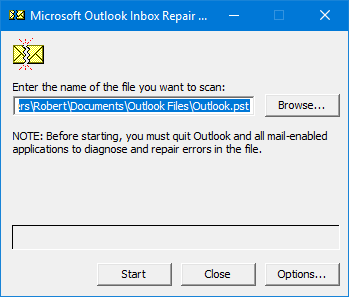
Use the Inbox Repair Tool (scanpst.exe) to scan your pst-file for errors.
Tip!
If you are having trouble locating scanpst.exe you can also use OutlookTools (free!).
For a step-by-step guide on how to work with scanpst.exe see Using the Inbox Repair Tool (scanpst.exe).
Recreate your mail profile
 When your mail profile is damaged, Outlook often fails to start as well or you’ll find yourself encountering one error after the other.
Solution:
Recreate you mail profile via the Mail applet in Control Panel. You can first add a new mail profile without deleting or otherwise affecting your current configuration just to see if it will indeed solve your issue. If so, you can easily migrate your Outlook data file from the broken mail profile to the newly created one. This process is described in detail in this guide.
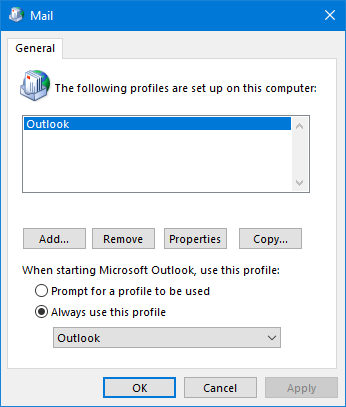
It’s quite normal to only have 1 mail profile for Outlook 
Run a Repair, Office Diagnostics or reinstall Office/Outlook
 When reaching this point of the guide, the issue most likely also occurs for other users on the computer. This means that the issue is not caused by a configuration setting but by an installation error.
Solution:
By running a Repair, Office Diagnostics or by reinstalling Office/Outlook you can probably resolve this issue. Note that during this process no files or settings of Outlook or other applications will be removed but it will of course never hurt making a backup of your Outlook data before you continue.
Depending on your version of Office/Outlook and/or Windows, you’ll have several of the following options available to you to start one of the above processes;
- Control Panel-> Add/Remove Programs…
- Control Panel-> Uninstall a Program
- Windows 10: Start-> Settings-> Apps
- Windows 11: Start-> Settings-> Apps-> Installed apps
- Insert the Office CD/DVD-> run Setup.exe-> choose Repair or uninstall Office completely and then install it again.
Tip!
After running any of the above processes, make sure you check for updates again to verify that all updates have been installed.
If the uninstall process fails, you can manually uninstall Office from your computer or use the Office Uninstall Support Tool (OffScrub.exe).
Check the Event Viewer and post in the Outlook forum for further help
 If, after trying all of the above solutions, Outlook still doesn’t start, it seems that common troubleshooting steps do not apply to your system and more information about your configuration and issue is needed.
Solution:
Open the Event Viewer and look at the Application Log for any error events that are registered by Outlook or happened at the time that you tried to open Outlook. Copy this error message and post it together with a short description of your system (think about; Outlook version, Windows version, type of e-mail account and add-ins you are using) in one of the Outlook Forums.
Tip!
For a short intro about how to access and read the Event Viewer in Windows, see this Quick Tip.

